Red Light Therapy Product Manufacturers
Official Site Only: ideatherapy.com | Beware of Counterfeits















Choosing Red Light Devices for a Rental Business
Selecting red light rental devices requires more than comparing purchase prices. Each unit must fit the delivery method, customer handover, cleaning process and service arrangements. A device that stays in a staffed wellness room creates different operational requirements from one repeatedly delivered to homes.
Build the specification around that rental cycle. Confirm the manufacturer’s conditions for rental or shared use, the exact product configuration and applicable warranty terms before committing to a fleet.

Specify red light rental devices for your service
Home rental places equipment with a customer for an agreed period. Priorities include manageable packaging, clear setup instructions, suitable placement and a straightforward return process. Establish who installs the unit and how customers report damage or operating problems.
Mobile delivery adds repeated loading, unloading and transport. Assess the complete packed kit, including cables, accessories and any stand. Consider stairs, vehicle space and whether assembly requires a second person.
Venue use keeps equipment at a studio, gym or wellness location. Staff access, room layout, operating limits and cleaning between users become central. A larger system may be practical here even when it is unsuitable for frequent deliveries.
The distributor buying guide provides background on matching product formats to business channels. Rental procurement adds the repeated issue-and-return workflow.
Compare red light rental devices by format
Use the panel specification guide to compare the exact configuration. The following published product features provide starting points for evaluation; rental suitability still needs confirmation.
| Product | Published features | Rental scenario to evaluate | Confirm before ordering |
|---|---|---|---|
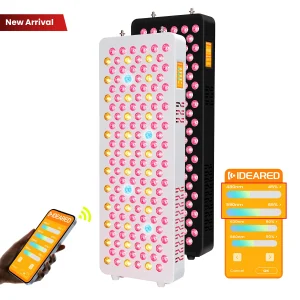
| RTL40A portable panel | Listed weight: 1.4 kg; dimensions: 245 × 30 × 135 mm; AC 100–240 V input | Home rental or compact delivery kits | Packed weight, supplied accessories, placement and handling instructions |
| RL60-R desktop panel | Rotatable desktop format; listed net weight: 4 kg ±0.5 kg; AC 100–240 V input | Desktop placement with an agreed setup | Rotation and transport instructions, surface stability and protective packaging |
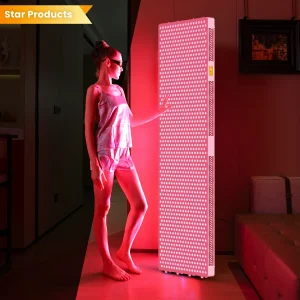
| RLPRO1200 panel with stand support | Full-body panel format; touchscreen, APP control and Bluetooth | Staffed venues or longer on-site placements | Stand inclusion and compatibility, installed footprint, assembly and moving requirements |
Both compact examples list AC input. Include access to a suitable outlet in the customer brief. Obtain the current specification and packing list for the version quoted.

Keep setup and handover simple
Check whether a new user can identify the controls, start and stop operation, and understand the supplied instructions. For devices with app control, clarify whether essential functions work locally and how pairing is cleared before reassignment.
For larger units, compare stands and accessories with the intended room and delivery route. Confirm approved mounting combinations, load limits, assembly instructions and cable routing. Record which components belong to each kit.
Prepare a handover sheet covering model identification, inventory, placement, operating instructions and the support contact. Use the manufacturer’s directions for distance, duration, ventilation, eye protection and operating restrictions. Ask the customer to confirm receipt of the complete kit and instructions.

Plan cleaning and return checks
Obtain written cleaning instructions for the exact enclosure, controls, cables and accessories. Confirm permitted products and methods, drying requirements and any components intended for individual use. Shared-contact wearables or masks need particular attention to their approved cleaning and reuse conditions.
Create a return checklist for housing damage, connectors, cable condition, missing accessories and control operation. Separate returned equipment from ready-to-issue stock until the required checks are complete. Remove damaged units from service and assign repairs to authorized personnel.
The UK HSE’s portable electrical equipment guidance describes a maintenance approach combining user checks, visual inspections and testing. Define the appropriate checks with a competent person, considering local requirements and the intended use.
Record the asset identifier, inspection date, findings and release decision so staff can see which unit is ready for its next hire.

Cost the full rental cycle
Compare red light rental devices using acquisition and operating costs. Include the unit, accessories, reusable packaging, inbound freight and applicable import charges. Then add delivery, collection, cleaning labor, inspection, consumables, storage, maintenance and payment processing.
A practical planning formula is:
Cost per completed hire = allocated equipment and fixed costs per hire + delivery and return costs + preparation and service costs per hire.
State the assumptions behind each allocation. Use expected completed bookings, rental duration, turnaround time and equipment availability. Model lower demand, delayed returns and a unit awaiting repair before setting a price.
Pilot results can then replace assumptions with actual preparation time, transport costs, support requests and downtime. No purchase price or product specification alone establishes profitability.
Confirm support for red light rental devices
Request written confirmation of rental or shared-use suitability, permitted operating patterns and warranty coverage for the proposed business model. Clarify exclusions, freight responsibility, replacement-part availability, repair procedures and how claims are assessed. A published warranty period does not establish coverage for a rental operation.
Evaluate a sample through your proposed packing, setup, handover and return process. Review the panel testing standards guide when defining the technical evidence and acceptance criteria with the supplier. Assess workflow separately from product performance.
Keep the approved configuration, manual revision and accessory list with the purchasing record. Agree how later component or firmware changes will be communicated so staff can support a consistent fleet.
Rental procurement FAQ
Can I supply red light rental devices for home use?
Confirm that the exact model, supplied instructions and intended use support your proposed service. Agree rental conditions with the supplier and check the requirements in your market before offering it to customers.
Is a portable panel always the best option?
The delivery model decides. Compact equipment can simplify handling, while a larger stand-supported system may fit a staffed venue. Compare the complete packed and installed kit, including accessories.
What should a rental quotation include?
Request the model and configuration, quantity, included accessories, packaging, documentation, sample terms, delivery scope, spare parts and written rental-use and warranty conditions.
Discuss your rental specification
To assess red light rental devices for your fleet, send IDEATHERAPY your project requirements. Include your country, home-delivery or venue model, expected quantity, preferred format, transport arrangements and support needs. Request a configuration-specific quotation, sample information and written clarification of rental-use conditions before placing a fleet order.






 简体中文
 Deutsch
 Français
 Português
 Italiano
 Русский
 한국어
 العربية
 日本語
 Svenska
 Polski
 Magyar
 Čeština
 Dansk
 繁體中文
 Nederlands
 Suomi
 Irish